Guard Tour System for Security Companies
Know which patrols were completed, late or missed — without chasing guards for updates.
Set patrol schedules. Guards scan checkpoints, even offline. Get timestamped PDF reports delivered automatically to your company's Google Drive as soon as the phone has a connection.
Team plans start at $10 per guard device per month, and the rate falls as you add devices: 5 devices is $44/month, plus tax where applicable. Automatic report delivery, your branding, and device management from the web.
Guards complete patrols on the Android app. Reports reach you automatically — delivered to your company's Google Drive, and listed in your manager dashboard. Set your team up from any computer or phone — iPhone included. Only your guards need Android.
Android app for your guards · works offline · free for individual guards
When a client asks, have the proof ready.
Sooner or later a client asks what happened on a shift. Piecing the answer together from paper logs, phone calls and scattered messages takes a day and still reads like a recollection.
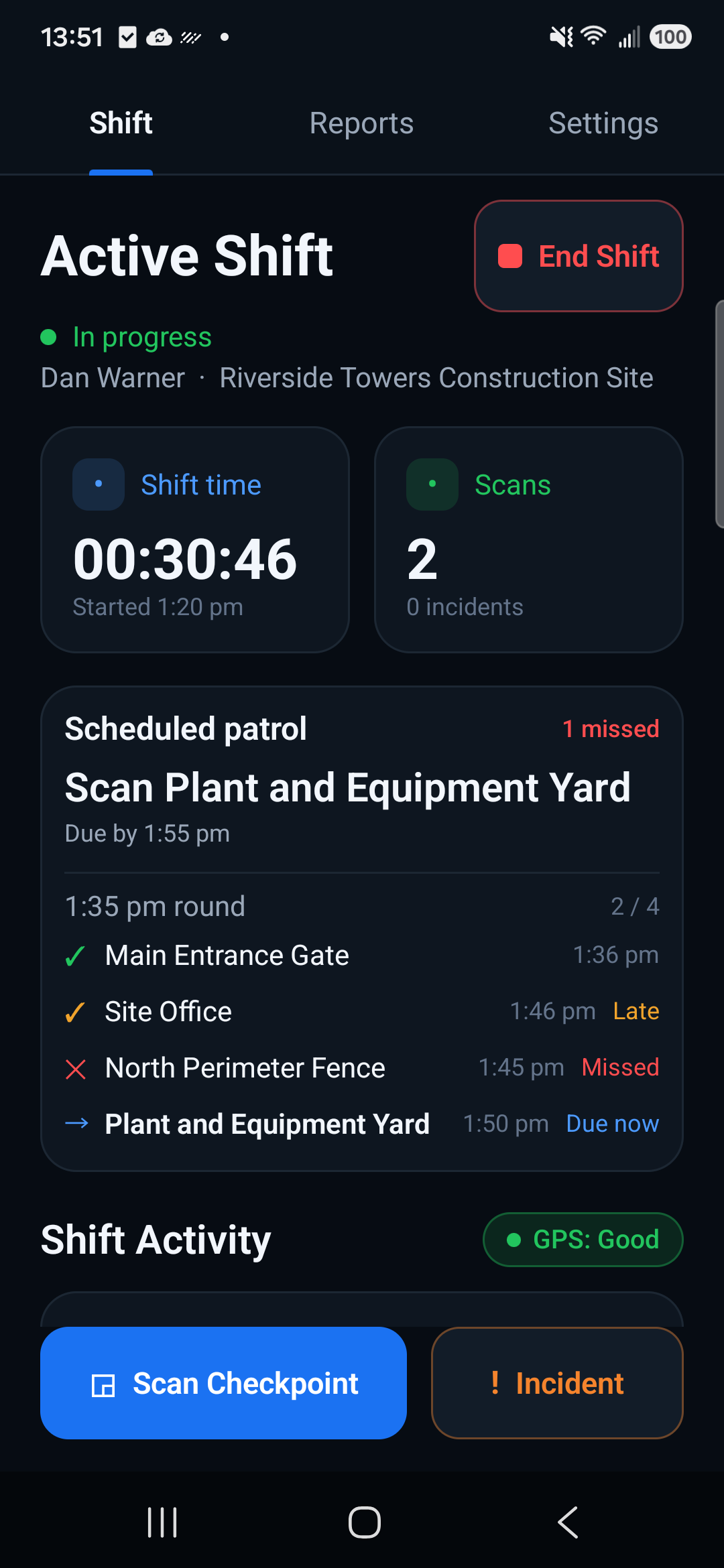
Give them a clear record instead: which scheduled checkpoints were completed, which were late, and which were missed, with the times beside them.
You don't just provide security. You provide proof the job was done.
See what was completed, late, or missed
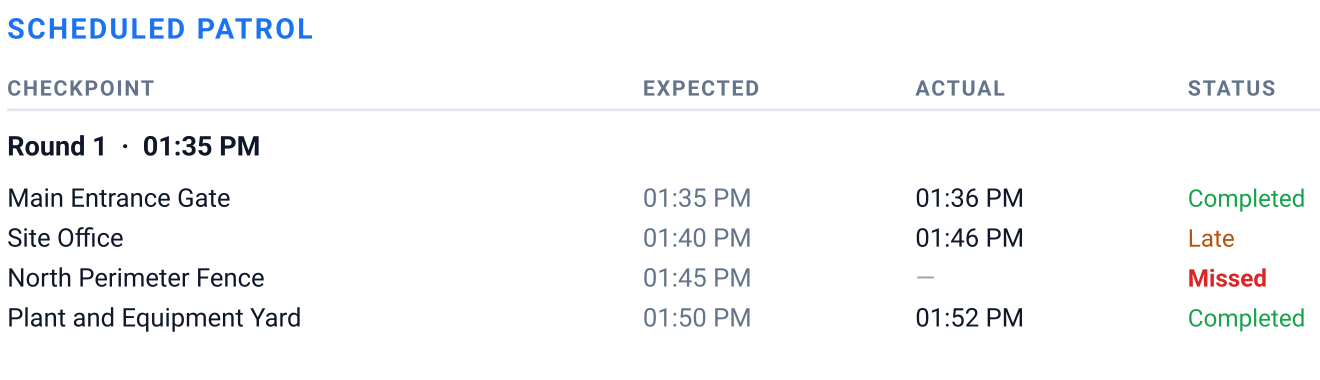
A scan tells you a guard was at a checkpoint. It does not tell you whether the round due at 1:35 was walked on time. Set the rounds a shift requires and every checkpoint is marked against that schedule, not just logged.
- Completed
- Late
- Missed
Your guards do the rounds. Team handles the reports.
The Android app is free for a guard and always will be. Team is for the person who has to collect, brand and keep what the guards produce.
Automatic Google Drive delivery
Every closed shift's report uploads itself into your company's Drive as soon as the phone has a connection, retrying on its own if it does not get through. Until it lands, the report is waiting on the phone rather than lost.
Your company branding, set once
Upload your name and logo in the web dashboard and every activated device uses it. Our footer comes off the report.
Device management from the web
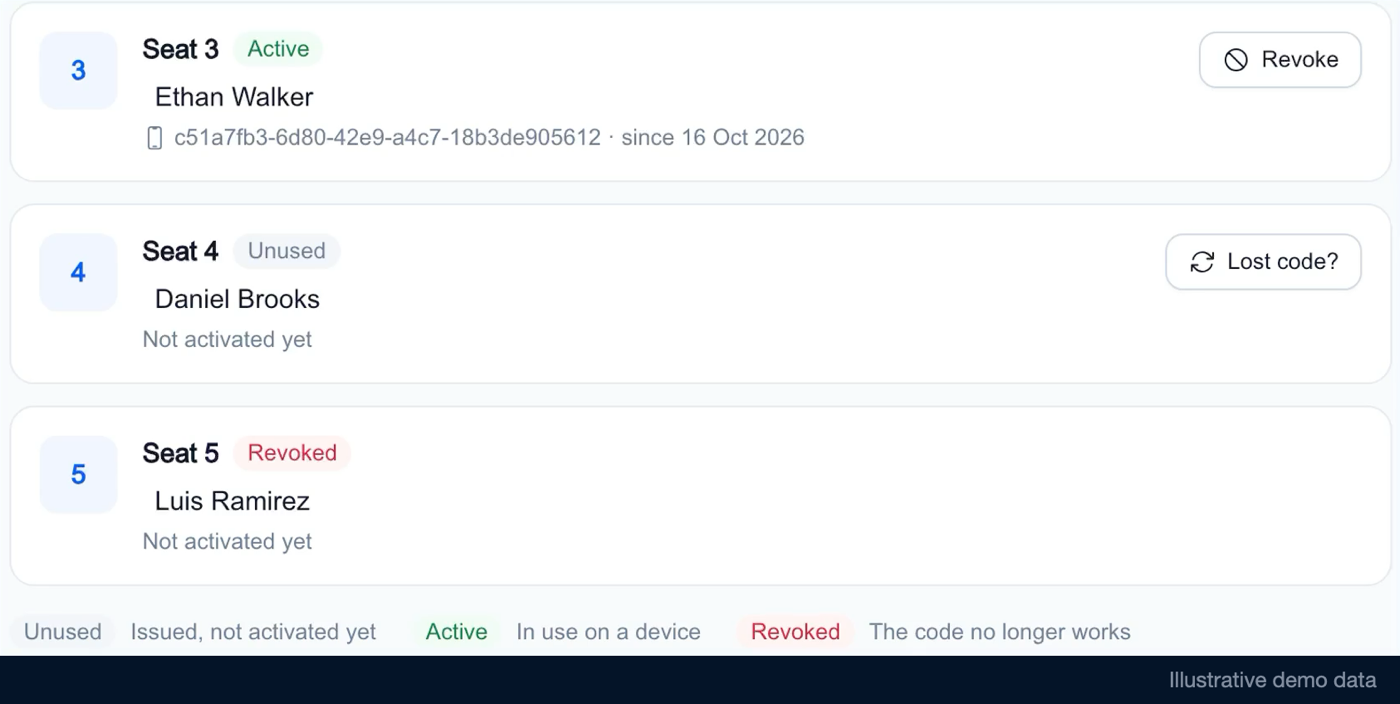
Issue an activation code for a new guard's phone, or revoke one that has left, from any browser. A revoked code stops working and that phone can no longer send reports. Your seat count is yours to change.
A manager dashboard for deliveries
See your seats, who has activated, and the reports that have arrived, each linking to the file in your Drive. It is a record of what was delivered, not a live view of guards on shift.
Already free on every guard's phone, with or without Team:
- QR checkpoint scanning, timestamped
- Incident reports with photos
- Works offline, with no signal on site
- A PDF shift report on the phone
Less time collecting reports. More time running your security business.
Simple for guards. Manageable for owners.
A guard tour system that runs on your guards' phones and is managed from the web.
Set up your team
Subscribe, connect your company's Google Drive, and hand each guard an activation code.
Guards complete their shifts
One code activates a device. After that a guard scans checkpoints and logs incidents — offline if the site has no signal.
Reports reach your Drive
Ending a shift writes the PDF on the phone. It uploads to your Drive as soon as that phone has a connection, retrying on its own until it lands.
Every guard on the job runs the same security guard patrol system, with no per-site setup to maintain.
Give clients more than a patrol log
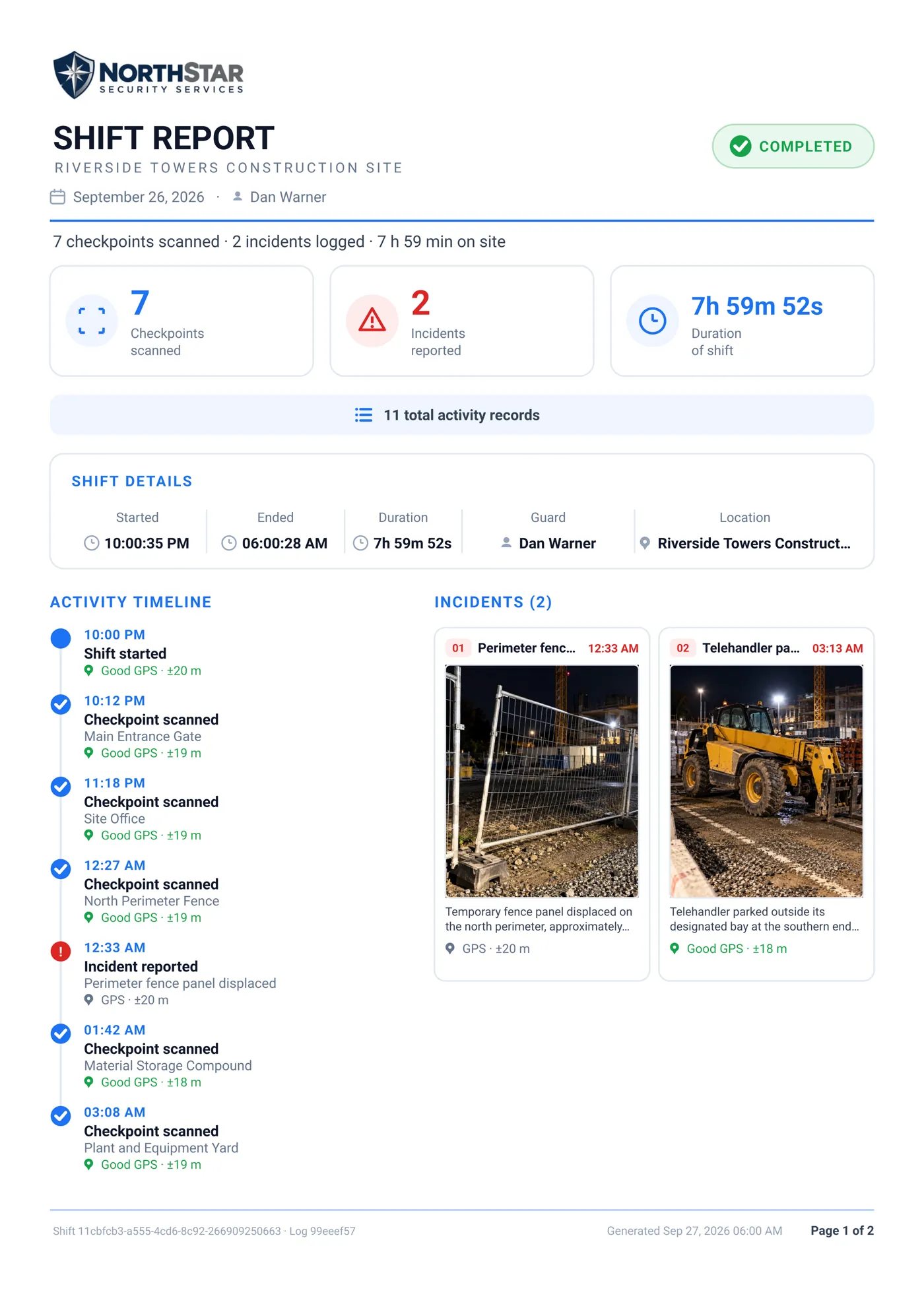
A different shift from the one above, and a different part of the document: this is the incident side — the timeline of the round, when and by whom, with photos of what mattered. The expected-against-actual table shown earlier is the Scheduled Patrol section of a report, and appears when the shift was run against a schedule. One report can carry both.
Built for small security companies, not enterprise complexity
Guards work on Android. You manage devices and branding from any browser, on any machine, with nothing to install. Buy one guard device or twenty-five, and change the number as the work does.
Setting up is short, and it is not nothing: subscribe, connect your Google Drive once, and give each guard their activation code. After that a guard opens the app and works.
Team for security companies
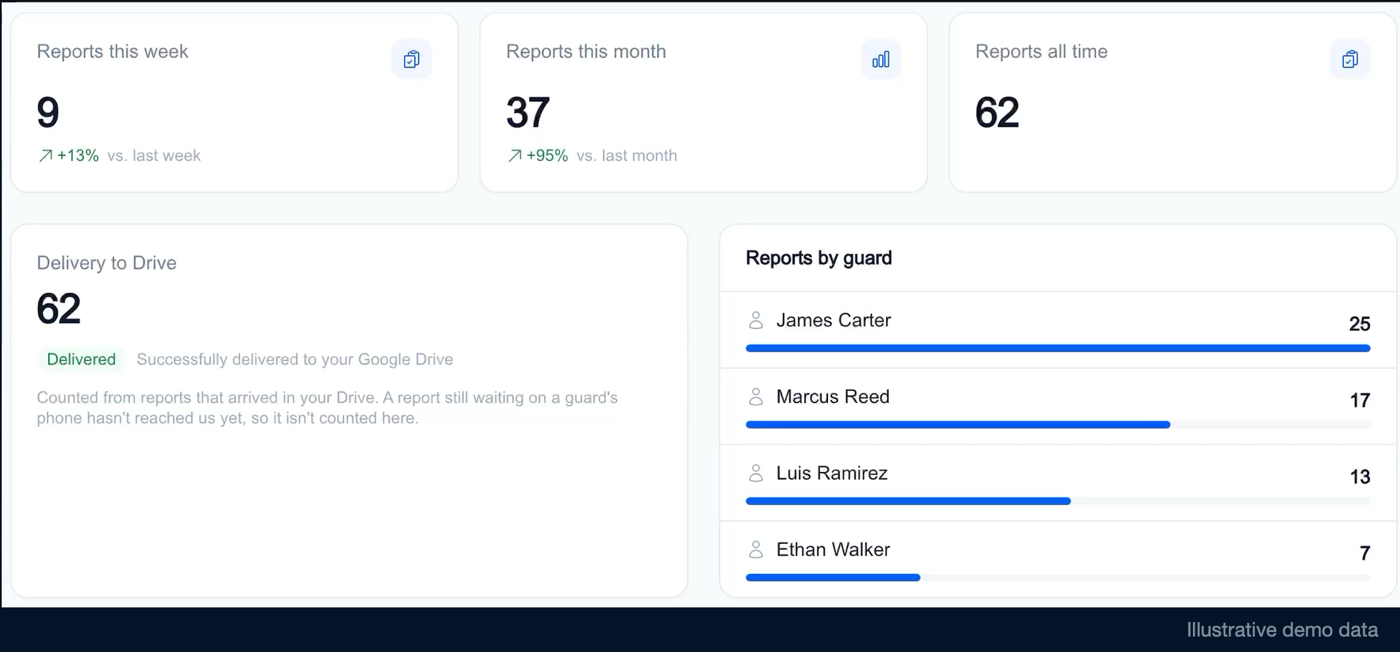
Manage guard devices from your browser and review shift report history in the Team dashboard.
Team pricing is per guard device.
Silent recording of the Team dashboard with illustrative data. The Drive connection and report deliveries are simulated.
Read the demo transcript
- 0:00 · Example shift reports in the manager dashboard. Demo account. Report counts are illustrative. Sample dashboard counters and a list of reports by guard.
- 0:05 · Manage guard devices in the Team dashboard. Team pricing is per guard device. A close-up shows example device seats.
- 0:08 · Device management Example states: active, unused and revoked. A revoked example also reads “Not activated yet”. The recording does not demonstrate revocation behaviour.
- 0:13 · Device management Team pricing is per guard device. The transition into Reports is re-framed onto the device seats.
- 0:14 · Example report history Team is priced per guard device. No live delivery is shown. The list has a search box, but no query is entered.
- 0:21 · Report logo settings The logo shown belongs to the demo account.
- 0:25 · Example Google Drive settings The connected state is simulated. No PDF was sent. The example connection uses a reserved .example address.
- 0:29 · See Team Pricing Below The clickable pricing link sits directly beneath the video.
See Team Pricing · 5 guard devices: $44/month, plus tax where applicable.
Choose Your Team Size
Pay per guard device, not per site. Your monthly rate gets lower as your team grows.
$44 / month
5 guard devices · avg $8.80/device
+ tax where applicable
Billed monthly · Cancel anytime.
More than 25 guard devices? Contact us
After you subscribe
- 1. Your activation codes are shown on the confirmation page — one per guard device. Save them then; they can only be collected for a short time, and support can reissue them if you miss it.
- 2. Connect your company's Google Drive from the manager dashboard. Reports are delivered into your Drive, so nothing can arrive until this is done.
- 3. Each guard enters their code once in the Android app. From then on that phone delivers its reports on its own.
Billed monthly and cancel whenever you like — cancelling keeps your access to the end of the month you have paid for. Tax is added where it applies, and refunds are available for 14 days.
Can I cancel or request a refund?
Yes. Cancelling stops future renewals, and Team stays active until the end of the period you have already paid for — your guards' devices keep delivering reports until then.
Refunds are covered by our published policy: you can request a full refund of a payment within 14 days of it being charged, for your first payment and for each monthly renewal, without giving a reason. Payments and refunds are handled by Paddle, our merchant of record. Cancelling on its own does not refund a past payment — ask for the refund as well.
Ready to know what happened on every shift?
Choose your devices, see your monthly price, and get started online.
Give your security company a clearer way to document scheduled patrols, manage guard devices, and deliver reports to clients. Guards install the Android app.